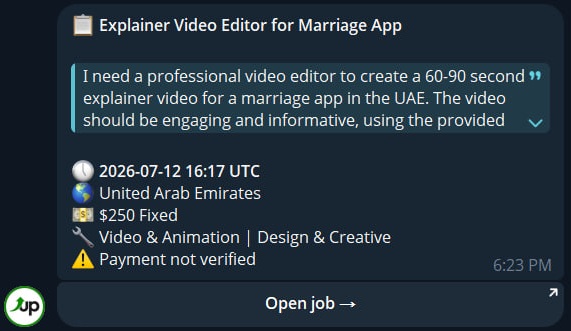

Message Format
Each job alert is a single Telegram message designed to help you evaluate the job at a glance.
Structure
| Element | What it shows |
|---|---|
| 📋 Title | The job posting title (bold) |
| Description | Full job description in a collapsible block — tap to expand |
| 🕔 Posted | When the job was published (UTC) |
| 🌎 Country | The client's country |
| 💵 Budget | Fixed price, hourly range, or unspecified |
| 🔧 Category | The job's category and group |
| ⚠️ Payment not verified | Shown only if the client lacks verified payment |
| Client info | Shown only if you have client filters active |
| Open job → | Button linking directly to the job on Upwork |
Budget Display
Budget is shown differently depending on the job type:
| Budget type | Display | Example |
|---|---|---|
| Fixed | Total price | 💵 $500 Fixed |
| Hourly range | Rate range per hour | 💵 $20-$40/hr |
| Hourly unspecified | No rate listed | 💵 Hourly (rate not set) |
Client Info
When you have client filters active (minimum rating, hire rate, or new client exception), the message also includes a Client line with available stats:
- ⭐ Client rating
- 📊 Hire rate
- 📝 Jobs posted
- 💰 Total spent
This section only appears for users who set client filters — it's not shown by default.
Description
The job description is inside a collapsible block. Telegram shows the first few lines with a "Read more" option to expand the full text. Long descriptions are truncated to fit Telegram's message limit.
Examples